






Real-ESRGAN: Training Real-World Blind Super-Resolution with Pure Synthetic Data
Paper • 2107.10833 • Published • 3
# No code snippets available yet for this library.

# To use this model, check the repository files and the library's documentation.

# Want to help? PRs adding snippets are welcome at:
# https://github.com/huggingface/huggingface.jsTensorRT engines of Real-ESRGAN, made by Moonbox for NVIDIA RTX GPUs. Each precision is one folder holding the
engine, trt_runner.py (a small numpy runner: TensorRT plus Polygraphy, no PyTorch) and a script that does the rest
of the pipeline. What the engine takes and returns is under How to run.
Compatibility. The engines are built hardware compatible (Ampere and newer: RTX 30, 40 and 50 series) and
version compatible (any TensorRT 10.x from 10.13 on, through its lean runtime). That costs a little speed against an
engine built for one GPU, but no rebuild is needed. Install the runtime with
pip install "tensorrt-cu12>=10.13,<11" "tensorrt-lean-cu12>=10.13,<11" polygraphy numpy.
The last column is the benchmark (details under How to run).
| Precision | File | Size | sha256 | Benchmark |
|---|---|---|---|---|
| fp16 | fp16/model.engine |
195.1 MB | ec7864d31aeb |
PSNR vs fp32 54.5 / 54.5 dB (worst 51.3 / 47.2), vs ground truth PSNR-Y 24.73 / 24.22, SSIM-Y 0.673 / 0.629 (Set14 / BSD100); 31 ms a picture (ONNX fp16 171 ms, fp32 86 ms) |
| fp16 | fp16/trt_runner.py |
2.2 kB | efa8ba97631b |
PSNR vs fp32 54.5 / 54.5 dB (worst 51.3 / 47.2), vs ground truth PSNR-Y 24.73 / 24.22, SSIM-Y 0.673 / 0.629 (Set14 / BSD100); 31 ms a picture (ONNX fp16 171 ms, fp32 86 ms) |
| fp16 | fp16/upscale_trt.py |
1.7 kB | 24e4d66005b3 |
PSNR vs fp32 54.5 / 54.5 dB (worst 51.3 / 47.2), vs ground truth PSNR-Y 24.73 / 24.22, SSIM-Y 0.673 / 0.629 (Set14 / BSD100); 31 ms a picture (ONNX fp16 171 ms, fp32 86 ms) |
Real-ESRGAN x4plus, the general 4x upscaler for real-world photos, as a TensorRT engine built from Moonbox's fp16
ONNX graph (exported from the official RealESRGAN_x4plus.pth, GitHub release v0.1.0).
import sys
from PIL import Image
sys.path.insert(0, "fp16")
from trt_runner import Engine
import upscale_trt
e = Engine("fp16/model.engine")
upscale_trt.upscale(e, Image.open("photo.png")).save("photo_x4.png")
Or python fp16/upscale_trt.py photo.png photo_x4.png. The engine takes RGB in 0-1 as input [1, 3, H, W] with H
and W from 16 to 768 (its optimization profile; tuned for 256), and returns output [1, 3, 4H, 4W].
upscale_trt.py tiles larger pictures (512 px tiles with 16 px of overlap).
Precisions. fp16 only: the ONNX fp16 graph's weights and math (fp32 inputs and outputs). No int8: this model's int8 ONNX build is weight-only, while TensorRT's int8 needs calibrated activations, and calibrated activation quantization hurts GAN upscalers' fine detail.
Benchmark.
| vs fp32: PSNR mean (worst) | vs ground truth: PSNR-Y / SSIM-Y | ms a picture | |
|---|---|---|---|
| ONNX fp32 (reference) | - | 24.73 / 0.673, 24.22 / 0.629 | 86 |
| ONNX fp16 | 59.1 (56.4) / 59.0 dB | 24.73 / 0.673, 24.22 / 0.629 | 171 |
TensorRT fp16/ |
54.5 (51.3) / 54.5 (47.2) dB | 24.73 / 0.673, 24.22 / 0.629 | 31 |
The two PSNR pairs are Set14 / BSD100. The times are medians per picture at these sizes (about 120 x 125 input pixels), with ONNX Runtime's CUDA provider for the ONNX rows.
From Real-ESRGAN at revision a4abfb2979: each engine was built with TensorRT's builder from Moonbox's published
ONNX graph of the same model and precision. The network is strongly typed: every tensor keeps the precision the
ONNX graph gives it, so an fp16 engine computes what the fp16 ONNX build computes. Built on an RTX 3080 Laptop GPU,
it was benchmarked against the original before upload, and the sha256 column above is what the files must hash to.
BSD-3-Clause. These files are a derivative of the original model and carry its license: it is copied in this repository, and it governs your use of these files. The original model card follows unchanged.

🔥 AnimeVideo-v3 model (动漫视频小模型). Please see [anime video models] and [comparisons]
🔥 RealESRGAN_x4plus_anime_6B for anime images (动漫插图模型). Please see [anime_model]

 | Online Colab demo for for Real-ESRGAN (anime videos):
Real-ESRGAN aims at developing Practical Algorithms for General Image/Video Restoration.
We extend the powerful ESRGAN to a practical restoration application (namely, Real-ESRGAN), which is trained with pure synthetic data.
🌌 Thanks for your valuable feedbacks/suggestions. All the feedbacks are updated in feedback.md.
If Real-ESRGAN is helpful, please help to ⭐ this repo or recommend it to your friends 😊
Other recommended projects:
▶️ GFPGAN: A practical algorithm for real-world face restoration
▶️ BasicSR: An open-source image and video restoration toolbox
▶️ facexlib: A collection that provides useful face-relation functions.
▶️ HandyView: A PyQt5-based image viewer that is handy for view and comparison
▶️ HandyFigure: Open source of paper figures
[Paper] [YouTube Video] [B站讲解] [Poster] [PPT slides]
Xintao Wang, Liangbin Xie, Chao Dong, Ying Shan
Tencent ARC Lab; Shenzhen Institutes of Advanced Technology, Chinese Academy of Sciences

--outscale (It actually further resizes outputs with LANCZOS4). Add RealESRGAN_x2plus.pth model.Clone repo
git clone https://github.com/xinntao/Real-ESRGAN.git
cd Real-ESRGAN
Install dependent packages
# Install basicsr - https://github.com/xinntao/BasicSR
# We use BasicSR for both training and inference
pip install basicsr
# facexlib and gfpgan are for face enhancement
pip install facexlib
pip install gfpgan
pip install -r requirements.txt
python setup.py develop
There are usually three ways to inference Real-ESRGAN.
You can download Windows / Linux / MacOS executable files for Intel/AMD/Nvidia GPU.
This executable file is portable and includes all the binaries and models required. No CUDA or PyTorch environment is needed.
You can simply run the following command (the Windows example, more information is in the README.md of each executable files):
./realesrgan-ncnn-vulkan.exe -i input.jpg -o output.png -n model_name
We have provided five models:
You can use the -n argument for other models, for example, ./realesrgan-ncnn-vulkan.exe -i input.jpg -o output.png -n realesrnet-x4plus
outscale) as the python script inference_realesrgan.py.Usage: realesrgan-ncnn-vulkan.exe -i infile -o outfile [options]...
-h show this help
-i input-path input image path (jpg/png/webp) or directory
-o output-path output image path (jpg/png/webp) or directory
-s scale upscale ratio (can be 2, 3, 4. default=4)
-t tile-size tile size (>=32/0=auto, default=0) can be 0,0,0 for multi-gpu
-m model-path folder path to the pre-trained models. default=models
-n model-name model name (default=realesr-animevideov3, can be realesr-animevideov3 | realesrgan-x4plus | realesrgan-x4plus-anime | realesrnet-x4plus)
-g gpu-id gpu device to use (default=auto) can be 0,1,2 for multi-gpu
-j load:proc:save thread count for load/proc/save (default=1:2:2) can be 1:2,2,2:2 for multi-gpu
-x enable tta mode"
-f format output image format (jpg/png/webp, default=ext/png)
-v verbose output
Note that it may introduce block inconsistency (and also generate slightly different results from the PyTorch implementation), because this executable file first crops the input image into several tiles, and then processes them separately, finally stitches together.
outscale. The program will further perform cheap resize operation after the Real-ESRGAN output.Usage: python inference_realesrgan.py -n RealESRGAN_x4plus -i infile -o outfile [options]...
A common command: python inference_realesrgan.py -n RealESRGAN_x4plus -i infile --outscale 3.5 --face_enhance
-h show this help
-i --input Input image or folder. Default: inputs
-o --output Output folder. Default: results
-n --model_name Model name. Default: RealESRGAN_x4plus
-s, --outscale The final upsampling scale of the image. Default: 4
--suffix Suffix of the restored image. Default: out
-t, --tile Tile size, 0 for no tile during testing. Default: 0
--face_enhance Whether to use GFPGAN to enhance face. Default: False
--fp32 Use fp32 precision during inference. Default: fp16 (half precision).
--ext Image extension. Options: auto | jpg | png, auto means using the same extension as inputs. Default: auto
Download pre-trained models: RealESRGAN_x4plus.pth
wget https://github.com/xinntao/Real-ESRGAN/releases/download/v0.1.0/RealESRGAN_x4plus.pth -P weights
Inference!
python inference_realesrgan.py -n RealESRGAN_x4plus -i inputs --face_enhance
Results are in the results folder
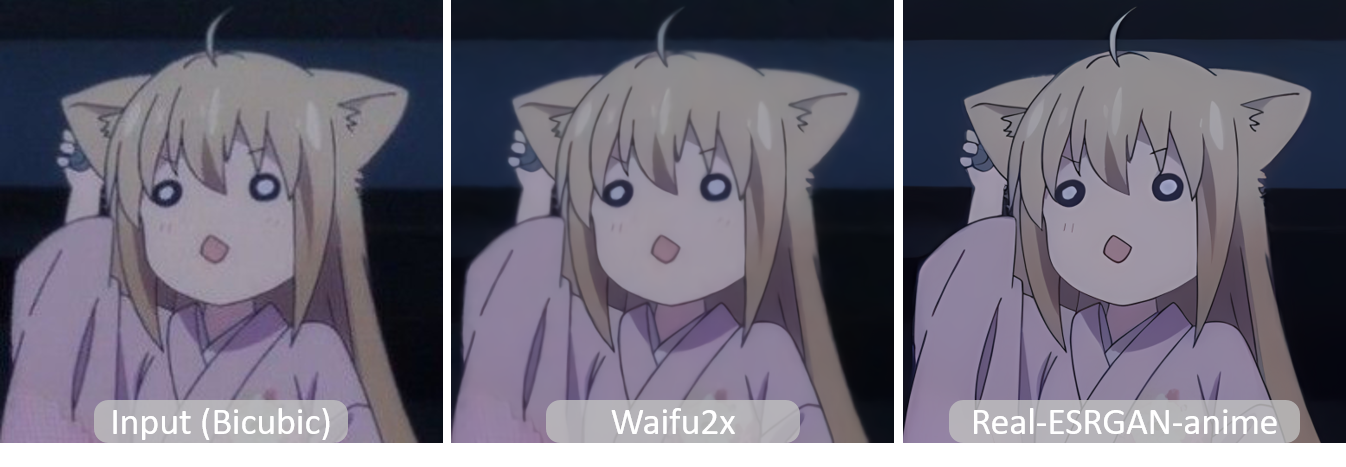
Pre-trained models: RealESRGAN_x4plus_anime_6B
More details and comparisons with waifu2x are in anime_model.md
# download model
wget https://github.com/xinntao/Real-ESRGAN/releases/download/v0.2.2.4/RealESRGAN_x4plus_anime_6B.pth -P weights
# inference
python inference_realesrgan.py -n RealESRGAN_x4plus_anime_6B -i inputs
Results are in the results folder
@InProceedings{wang2021realesrgan,
    author    = {Xintao Wang and Liangbin Xie and Chao Dong and Ying Shan},
    title     = {Real-ESRGAN: Training Real-World Blind Super-Resolution with Pure Synthetic Data},
    booktitle = {International Conference on Computer Vision Workshops (ICCVW)},
    date      = {2021}
}
If you have any question, please email xintao.wang@outlook.com or xintaowang@tencent.com.
If you develop/use Real-ESRGAN in your projects, welcome to let me know.
GUI
Thanks for all the contributors.