

GameDojo
Collection
GameDojo • 2 items • Updated • 1










Kuan Zhang1,*, Zhihao Yang2,*, Yukun Chen2,*, Xingyiliang Yin3, Mingyu Ouyang4, Yue Su5, Xiangnan Wu2, Jiaming Li2, Longze Chen2, Run Luo4, Zirong Chen1, Lu Wang1,†, Yiming Li1,†
1 Tsinghua University 2 University of the Chinese Academy of Sciences 3 University of Macau 4 National University of Singapore 5 University of Hong Kong
* Equal contribution † Co-corresponding authors
GameDojo-4B is a vision-language model for video game boss encounters. It takes game observations and task context and generates keyboard and mouse actions for the GameDojo computer-use (CUA) interface. Each action chunk covers 200 ms of game control.
GameDojo provides 120 boss encounters across 20 game environments, split evenly between 2D and 3D. Its CUA and Semantic interfaces expose different levels of action abstraction. Real-time and time-paused modes let researchers vary whether the simulation advances during inference.
We fine-tuned Qwen3.5-4B with supervised learning on a balanced 240-hour subset of GameDojo-Data. The subset contains 40 minutes of gameplay for each of the 120 bosses at each of three difficulty levels (Easy, Medium, and Hard).
We evaluate GameDojo-4B through CUA in both timing modes at all three difficulty levels. We report average win rate and average progress. A win requires defeating the boss, and progress measures the fraction of total boss health removed during the episode.
The checkpoint is distributed as BF16 Safetensors. Download it together with its configuration and processor files.
hf download THUSI-Lab/GameDojo-4B --local-dir GameDojo-4B
import torch
from transformers import AutoProcessor, Qwen3_5ForConditionalGeneration

repo_id = "THUSI-Lab/GameDojo-4B"
processor = AutoProcessor.from_pretrained(repo_id)
model = Qwen3_5ForConditionalGeneration.from_pretrained(
    repo_id, dtype=torch.bfloat16, device_map="auto"
).eval()
Use the bundled chat_template.jinja to format observations and task context. Pass the generated actions to the GameDojo CUA executor to advance the encounter.
This example uses the Terraria King Slime CUA system prompt shown in the GameDojo supplementary material. The conversation contains this system prompt and one image-only user turn.
You are an experienced PC game player, proficient in keyboard and mouse operations. You are playing "Pixel Arena: Sword and Bow". Based on the current game screen and the corresponding historical trajectory, plan the next 200ms of actions, consisting of 6 steps. Each step is spaced 33ms apart. Every step lasts 33ms from its start time until the next step begins.

Output Format
<|action_start|>X Y Z ; k1 k2 ; k3 ; k4 ; k5 ; k6 ; k7<|action_end|>

Explanation
1. Mouse Movement: Relative integers X, Y in [-1000, 1000] (X>0 right, Y>0 down) and scroll Z in [-5, 5] (Z>0 up).
2. Key Sequence: 6 groups separated by ;; space-separated keys within each group (at most 4 keys/group). Leave an empty group blank while keeping ;. Keys listed in consecutive groups stay held; unlisted keys are released.
3. Output only one plain line matching the format, with no line breaks or quotes.
Key Naming Rules: Capital letters (W, A), capitalized names (Space, Shift), mouse buttons (LB, RB).

Game: Side-view 2D arena with two wooden platforms. Empty the boss's health bar within 300 s without losing all health.
Controls (only these keys are active): A/D move left/right; Space jump/fly; S drop through platform; J/LB use weapon; Q swap sword/bow; E shoot bow at crosshair; RB swing sword.
Mouse: X/Y move crosshair (1000 = full screen width/height); bow shoots toward crosshair.
Boss: King Slime: Giant gel creature that leaps to crush you, sheds small blobs when hit, and teleports near you. Moves: 1. Leap; 2. Teleport; 3. Gel Spawns.
Health bars and other status are shown on the screen; read them yourself.
The source frame below is resized to 854 × 480 and JPEG-encoded at quality 90 before inference.
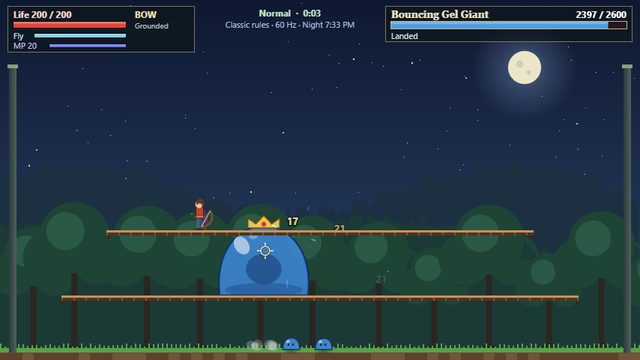
The published BF16 checkpoint generated this reply with its non-thinking chat template. The run used Transformers 5.24.0 on Apple MPS, sampling at temperature 1.0 with top-p 1.0, no top-k cutoff, and a 256-token limit. Generation stopped upon emitting <|action_end|>.
<|action_start|>-7 33 0 ; E S ; E S ; E S ; E S ; E S ; E S<|action_end|>The mouse deltas move the crosshair left and down, with no scroll. Each of the six steps holds E to shoot the bow and S to drop through the platform.
Load processor and model as shown above. Save the system prompt as king_slime_cua_prompt.txt and the source image as king-slime.jpg.
from io import BytesIO
from pathlib import Path

from PIL import Image
import torch

system_prompt = Path("king_slime_cua_prompt.txt").read_text(encoding="utf-8").rstrip("\n")
with Image.open("king-slime.jpg") as source:
    encoded = BytesIO()
    resized = source.convert("RGB").resize((854, 480), Image.Resampling.LANCZOS)
    resized.save(encoded, format="JPEG", quality=90)
frame = Image.open(encoded).convert("RGB")

messages = [
    {"role": "system", "content": system_prompt},
    {"role": "user", "content": [{"type": "image", "image": frame}]},
]
inputs = processor.apply_chat_template(
    messages,
    add_generation_prompt=True,
    tokenize=True,
    return_dict=True,
    return_tensors="pt",
).to(model.device)

torch.manual_seed(42)
with torch.inference_mode():
    output = model.generate(
        **inputs,
        do_sample=True,
        temperature=1.0,
        top_p=1.0,
        top_k=0,
        max_new_tokens=256,
        stop_strings=["<|action_end|>"],
        tokenizer=processor.tokenizer,
    )
new_ids = output[0, inputs["input_ids"].shape[-1]:].tolist()
print(processor.decode(new_ids, skip_special_tokens=False, clean_up_tokenization_spaces=False))